


ZUS - Save Car Expenses
4.72.90K Reviews
App Specs
- Version
- 8.20.5
- Updated On
- License
- Free
- Downloads
- 500,000+
- Developer
- No NDA Inc
- Categories
- Auto & Vehicles
- Platform
- Android
Screenshots
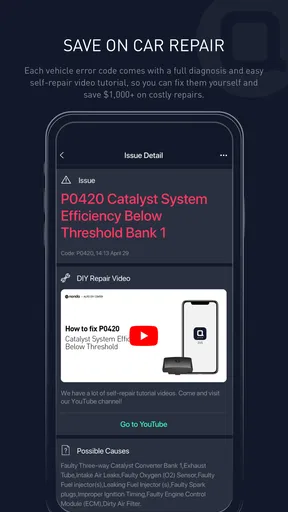
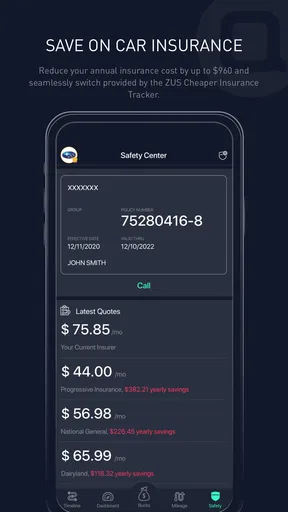
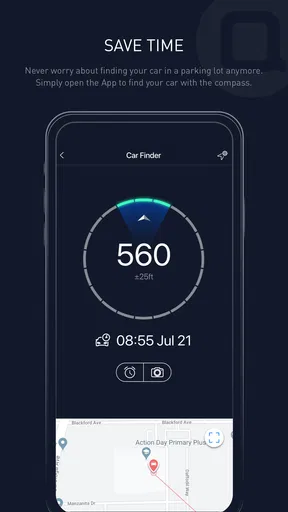
 Analysis by AppCompare
Car costs are easy to underestimate because they arrive in different forms: fuel today, a service bill months later, and small purchases that vanish into a wallet or card statement. ZUS - Save Car Expenses brings several parts of car ownership into one app, so I can look back at spending and build routines around upcoming upkeep. I see it as a practical helper, not a replacement for a mechanic, a full accounting system, or careful attention on the road.
A useful routine starts with consistent entries
The biggest benefit depends on a small habit: recording costs close to when they happen. If I wait until the end of the month, I’m likely to forget a car wash, a top-up, or a minor repair. Logging a fuel purchase or service expense while the receipt is still in front of me gives the record more value later, when I want to understand what the car is actually costing me.
I’d keep entries specific enough to be useful without turning the task into bookkeeping. A maintenance bill is more informative when it is recorded as maintenance rather than lumped into a vague general expense. Over time, that makes category totals easier to interpret. The point is not perfect accounting; it is being able to spot patterns and make a sensible plan for the next few months.
Choose a tracking style you can sustain
It is tempting to add every possible detail at the start, but a demanding setup can make an expense tracker feel like another chore. I’d begin with the costs I most want to understand—fuel, routine maintenance, and repairs—and add other categories only when they answer a real question. If I’m trying to reduce fuel spending, for example, fuel entries deserve consistency before I worry about recording every minor purchase.
Reminders are most useful when they match a real action I intend to take. A service reminder can help me plan ahead, but it does not inspect the vehicle or determine what work it needs. I’d treat it as a prompt to check the owner’s manual, service records, or advice from a qualified mechanic, rather than as a diagnosis. That distinction keeps an organizational tool from becoming a substitute for proper care.
Making the app fit everyday car ownership
I’d treat the settings as part of the routine, not a one-time setup: choose only the tracking and notification options that support how you actually use the car, then revisit them if the app starts to feel noisy. For a shared vehicle, agreeing who records each kind of expense can also keep the history dependable. With that foundation in place, the next useful step is finding a lighter way to keep the habit going.
Settings worth checking before relying on it
Before building a long history, I’d review the app’s available settings and make sure its reminders and tracking choices suit how I use my car. In particular, I would check which driving-related options I actually want active and whether the app’s notifications are helpful rather than easy to dismiss. Those choices matter because a tool that interrupts too often can end up muted, while a reminder that arrives at a useful time can become part of a reliable routine.
Worth Reading Before You Choose

EA SPORTS FC Mobile 26 Is a Bigger Football Game, but It Takes Time

Flipboard Shows What News Apps Must Do Beyond the Feed

Switching to Android Auto Means Rethinking Your Driving Routine

Google Calendar Makes a Crowded Week Easier to Manage

Ludo King Makes the Most of the Minutes Between Plans

Baby Panda World Brings Quick Play to Modern Phones, but Its Game Library Feels Busy
I’d also think about who is responsible for entering costs if a household shares a vehicle. If one person records fuel and another handles repairs, agreeing on a simple routine can prevent gaps and duplicated entries. A shared habit is more valuable than an elaborate record that only one driver understands. For a car used by one person, the same principle applies: make the process quick enough to repeat after ordinary trips and service visits.
Faster patterns for busy weeks
A realistic workflow might look like this: after filling up, I enter the fuel expense before leaving the parking space; when a service appointment is booked, I use the reminder as a nudge to keep the date visible; and after the visit, I record the bill while I still have it. This does not require checking the app throughout the day. A few deliberate moments tied to events that already happen are easier to maintain than a daily data-entry target.
Another useful approach is to review spending at a regular interval instead of opening the dashboard whenever I feel curious. A monthly glance can help me notice that a seemingly inexpensive vehicle has had several repair costs, or that fuel spending has changed alongside my driving routine. I would use that view to ask better questions—what changed, and is it likely to continue?—rather than treating one high month as a definitive forecast.
For a driver who wants to improve fuel habits, the driving insights can be more actionable when paired with a specific experiment. I might focus on smoother braking for a period, then see whether the app’s feedback reflects a change, rather than trying to improve every driving measure at once. This is a personal learning aid, not a reason to chase a score at the expense of safe, calm driving. Road conditions and traffic are not fully under a driver’s control.
Where it differs from simpler alternatives
A notes app or spreadsheet can record car spending with fewer prompts and more freedom over how information is organized. That may be the better choice if I only want a basic ledger, dislike app reminders, or need a format I can customize extensively. ZUS is more appealing when I want expense tracking alongside car-related reminders, driving feedback, rewards, and a community in one place. The trade-off is that a broader tool can feel busier than a plain list, and its value depends on which of those parts I will actually use.
It also occupies a different role from a bank statement. A statement can show that I paid a garage or fuel station, but it may not explain what the charge was for or connect it to a maintenance record. Recording that context in a car-focused app can make later reviews more useful. I would still keep receipts and service paperwork where needed; an app entry is a convenient summary, not proof of work performed or a replacement for the documents a repair shop provides.
Who will get the most from it—and who may not
I think the app suits drivers who want to understand the running costs of a car, especially people who have previously relied on memory and then been surprised by a cluster of bills. It can also help someone preparing for a future service visit by keeping expenses and reminders in view. The strongest case is for a driver willing to enter information consistently and interested in more than a bare spending total.
It is less compelling for someone who rarely drives, already has a tracking system they use reliably, or wants a completely manual record with no additional driving or community elements. If I only need to split one repair bill or note a single fuel purchase, a simple note may be quicker. And if the goal is mechanical diagnosis, vehicle repair instructions, or professional financial advice, this is not the tool I would rely on for those jobs.
What the app can—and cannot—tell you
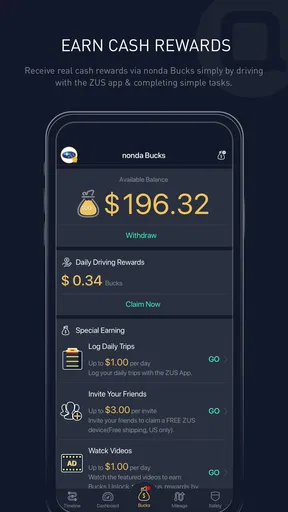
One practical question is whether rewards make the habit worthwhile. I would treat them as an extra incentive, not as guaranteed savings or a reason to change how I drive. The reward system can make routine participation feel more engaging, but the meaningful return is still the clearer record and the chance to plan expenses rather than being caught off guard. Any in-app purchases should also be considered separately from the fact that the app itself is free to install.
Another question is whether driving analytics can prove that a particular habit saved money. I would be cautious about drawing a firm conclusion from a single trip or score. Traffic, route, weather, and the condition of the car all affect a drive, so feedback is best used to reflect on patterns rather than as a precise fuel-cost calculation. I would never interact with tracking screens while driving; any review belongs before setting off or after parking safely.
There is also a privacy and battery consideration whenever an app includes trip-related tools. Before enabling any option, I’d read the explanations presented in the app and decide whether the benefit is worth the access and background activity involved. I would not turn on a feature merely because it exists. If I only want to log costs, keeping the workflow focused on expenses and reminders may be a better fit than using every driving feature.
First impressions and setup
Setting up ZUS - Save Car Expenses was a breeze. After downloading it from the app store, which was quick and painless, I was up and running in no time. The interface is super user-friendly, even for someone like me who tends to get lost in complicated apps. It's clean, intuitive, and doesn’t overwhelm you with too many options right off the bat.
The app’s dashboard is where the magic happens. It provides a snapshot of your car’s health and expenses, all in one place. I love how it gives you that instant overview without having to dive into different menus.
Tracking expenses
One of my favorite features is the expense tracker. You can log everything from fuel expenses to maintenance costs. It’s as simple as entering the details and letting the app do the rest. Plus, it automatically organizes your expenses into categories, making it super easy to see where your money is going.
The app even allows you to set reminders for upcoming expenses or maintenance tasks. I set a reminder for my next oil change, and it’s nice not having to rely on my notoriously bad memory.
Driving feedback and staying engaged
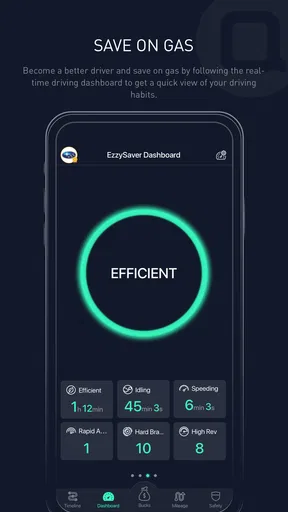
Now, here’s where it gets really interesting. The smart driving assistant feature is like having a co-pilot. It provides real-time driving analytics to help you improve your driving habits. Not only does this feature aim to make you a better driver, but it also helps in saving on fuel. Who knew driving efficiently could be so satisfying?
"The app’s ability to track and analyze driving habits is genuinely impressive."
It tracks your trips, providing insights into your driving style, speed, and even your braking habits. I found myself trying to improve my scores, which was oddly motivating.
Community features
Another cool aspect is the community feature. You can connect with other users to share tips and advice. It’s a nice touch, especially when you’re looking for recommendations or just want to brag about your fuel-saving victories.
The app also has a rewards system that encourages you to complete certain tasks, like logging your expenses regularly or improving your driving score. It’s a fun way to stay engaged and motivated.
My verdict after using it
Overall, I’m genuinely impressed with what ZUS - Save Car Expenses brings to the table. It’s more than just an expense tracker; it’s a full-fledged car management tool that makes life a whole lot easier. Whether you’re someone who meticulously tracks every penny or just wants to ensure your car’s in good shape, this app has got you covered.
It is a free app in the auto-and-vehicle category from No NDA Inc, with an average rating of 4.7 from around 14,000 ratings and over 500,000 installs. It is rated for everyone, and version 8.20.5 runs on Android 6.0 and later. I’d describe its strongest appeal as bringing expense records, maintenance prompts, driving feedback, and engagement features together, rather than doing one narrow job with maximum flexibility.
So if you’re looking to take control of your car expenses and maybe even learn a thing or two about efficient driving, I’d say give it a shot. You might just find yourself wondering how you ever managed without it.
Pros
- User-friendly interface for easy navigation.
- Tracks mileage and expenses efficiently.
- Real-time vehicle location tracking.
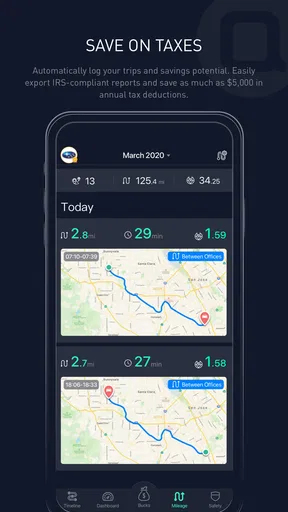
- Automatic trip logging feature.
- Integrates with multiple car models.
Cons
- Limited free version features.
- Requires GPS for accurate tracking.
- Can drain battery quickly.
- Data sync issues reported by users.
- In-app ads can be intrusive.
FAQs for ZUS - Save Car Expenses
What is ZUS - Save Car Expenses used for?
ZUS - Save Car Expenses is designed to help users manage and reduce their vehicle-related expenses efficiently. It allows you to track your mileage, monitor fuel consumption, and receive maintenance reminders. Additionally, it offers features like finding nearby gas stations with the best prices, making it an essential tool for budget-conscious car owners.
How does ZUS help in tracking fuel consumption?
ZUS uses your phone's GPS and connected car devices to accurately track your vehicle's fuel consumption. By inputting fuel purchase details, it calculates your car's efficiency and provides insights on how to optimize fuel usage. This feature helps users save money by identifying fuel-wasting habits and suggesting improvements.
Is ZUS compatible with all car models?
ZUS is compatible with most car models that have an OBD-II port, which is standard in vehicles manufactured after 1996. The app connects with the ZUS Smart Vehicle Health Monitor to provide detailed insights. However, it's always best to check compatibility with your specific vehicle model on the ZUS website before purchasing any hardware.
Does ZUS require any additional hardware to function?
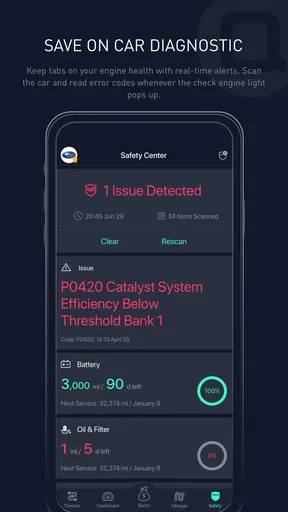
While the app itself can operate independently for basic features, to fully utilize all functionalities, such as vehicle diagnostics, you would need the ZUS Smart Vehicle Health Monitor. This device plugs into your car's OBD-II port and works seamlessly with the app to provide comprehensive vehicle health reports.
How secure is my data with ZUS?
ZUS takes user privacy and data security seriously. It employs encryption protocols to protect your information from unauthorized access. The app does not store personal data unnecessarily and complies with relevant data protection regulations. Users can also opt-out of data sharing features if they prefer.


